Enterprise grant
Same labels as the MIT runtime. The daemon on :8765 turns them into a grant.
A exceeds the limit and gets a local OOM. B keeps serving. We sell that layer. We do not rent GPUs.
What you buy
Daemon, allocator, CUDA VMM, libvram.so / libvram.dylib, dashboard.
Admission: a third tenant that does not fit is refused at register. Nobody dies mid-kernel for that.

| Without (MIT only) | With getvram | |
|---|---|---|
| B 4g | Serves. Can die when A eats the card. | Serves. Still serves after A dies. |
| A 512m | Label is recorded. Load can take the card. | Local OOM. B keeps answering. |
| C extra 1g | No door. Starts anyway. | Refused at register. |
The shot
Two Ollama on one consumer NVIDIA. B at 4g loads tinyllama and generates.
A at 512m tries the same model and fails the grant. B generates again.
How the grant works
- OCI hook (MIT) reads
vram.limitand talks to the daemon. - Daemon admits the tenant or refuses if the budget is gone.
- Workload loads
libvram. On Linux the process imports a CUDA VMM heap sized to the grant (cuMemImportFromShareableHandle). - Allocations spend that heap. Over the grant:
CUDA_ERROR_OUT_OF_MEMORYin that process. The neighbor keeps its own handle.
Count-only (hook records bytes, CUDA still allocates from the card) is not the Linux product. The imported heap is.

Linux
Install the MIT runtime first (open source docs).
Then the daemon and libvram.so on the host. The runtime bind-mounts the library and the isolation socket into the guest.
docker run --runtime=vram -l vram.limit=4g ollama/ollama
Demo we actually ran: B vram.limit=4g on :11444, A vram.limit=512m on :11445, both tinyllama.
A fails the grant. B still answers.
vram status, ps, top, inspect, set talk to http://127.0.0.1:8765.
If you already have that daemon, the MIT example script examples/linux-two-ollama.sh is the with.
Apple Silicon
Docker Desktop is a Linux VM. Host Metal cannot police those containers.
Path: vram run --limit=1g -- ollama serve with libvram.dylib.
Unified memory. There is no CUDA cascade onto a neighbor. A over the grant gets nil from Metal. B still allocates. C is refused at register.
The product on a Mac is the quota, not a neighbor kill.
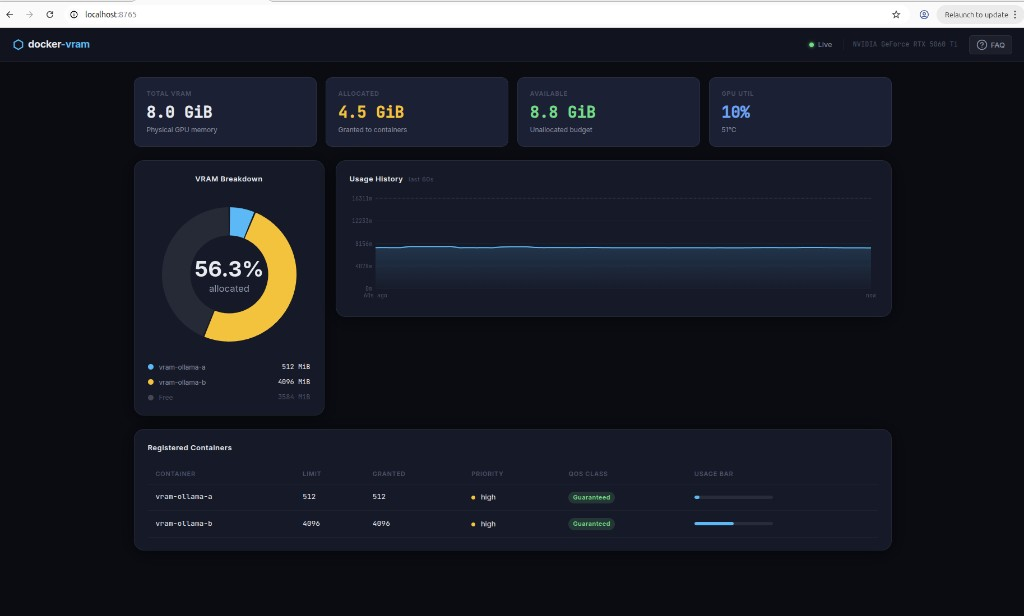
Dashboard
While the daemon is up: http://127.0.0.1:8765/.
GPU budget, each tenant’s limit and spend, names from Docker (vram-ollama-a, vram-ollama-b).
Mail hello@getvram.com for a node license and for support. You run the daemon on your machine. There is no hosted cluster and no Kubernetes SKU. Support is email. We answer. It is not a 24/7 operations contract.